
See what moved in every programme update
Path is a Mac app that reads a project’s Primavera P6 updates. It shows how far the finish moved, what changed between any two, and answers your questions with a model that runs on your own Mac.
v1.0.0macOSApple silicon
Early access: there is no public installer yet, so Download takes you to book a short call.
- ReadsXERPrimavera P6 programmes, read as P6 exports them. Nothing to convert first.
- Compares13kinds of change counted between any two updates.
- Checks4warnings Path looks for in every update. A yellow mark shows when one trips.
- Uploads0files uploaded. Path reads the folder where it sits.
1.0Read
A folder of updates becomes a case
Point Path at the folder where a project’s programme updates are kept. It reads every XER file, up to two subfolders deep, and lines the updates up by data date.
Updates in order, strays set aside
Identical copies count once. Files from another project, and exports that hold several projects, are listed under Not used.
The baseline, found for you
Path takes the earliest file with no progress as the baseline. Choose a different file if you know better.
Your folder is read, never written
Path keeps its own notes in its own data folder. Remove from Path only makes Path forget the case: the folder and its files are not touched.
2.0Follow
Watch the finish move, update by update
Every update gets a row: its data date, its activities, the finish date P6 saved, and how many calendar days that finish moved since the update before.
Later in red, earlier in green
Nahla Gate Building, a made-up project: across eight updates the finish went from 10 Jun 2027 to 4 Jul 2027, and came back 17 days in the last one.
Four checks, one yellow mark
Path keeps every update in the run and marks the ones worth a second look, so the call stays yours.
Any update as a Gantt chart
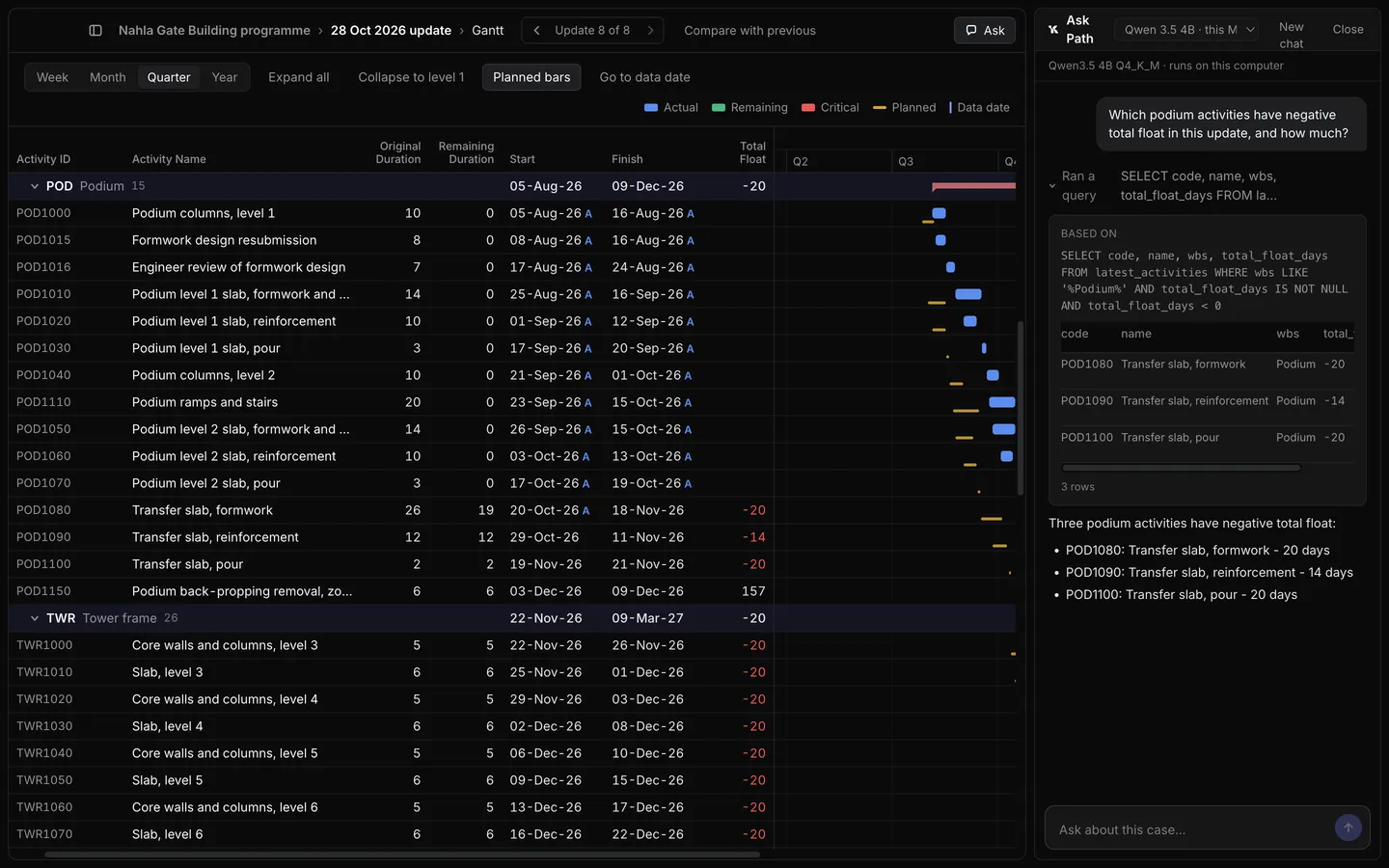
Activity ID, name, original and remaining duration, start, finish and total float, grouped in work breakdown bands. Zoom by week, month, quarter or year, with planned bars, critical work in red and a line at the data date.
3.0Compare
Thirteen kinds of change, counted
Pick any two updates. Path matches their activities and counts what changed, from activities added or deleted to every finish date that moved.
One month of Nahla Gate Building
Between the August and September updates the finish moved 9 days. Path found 67 finish dates moved, 7 activities progressed and 4 actual dates changed.
Critical only
Narrow any list to the activities on the critical path, as the file’s own P6 setting defines it.
From the row to the bar
Click a row and Path opens the later update’s Gantt chart at that activity.
4.0Ask
Ask in plain words. See the rows behind the answer.
Ask about the case the way you would ask a colleague. Path looks each answer up in the files, and shows the rows or the query it used underneath.
Based on
Every answer carries the table it came from, so you can check it against the programme before you rely on it.
Six ways to look things up
A summary of the case, one activity across every update, two updates compared, the updates Path has marked, what is driving an activity, and a query for anything to count, list or sort.
What did the transfer slab delay cost?
The schedule data doesn’t show costs. It holds dates, durations, float, status and logic.
Not in a programme
- Cost
- Manpower
- Contracts
- Cause of delay
It says when the programme can’t tell you
Path holds the programme only: dates, durations, float, status and logic. Ask about cost, manpower, contracts or the cause of a delay, and it says the programme doesn’t show it.
5.0Local models
The AI runs on your Mac, not in a cloud
Ask is answered by an open model running inside Path. The programme, your questions and the answers stay on the computer: no upload, no account, no API key.
Everything inside the line stays on your Mac
Path reads the folder, looks up the rows and hands them to a model running beside it. The cloud is there only if you choose it.
Works offline
With the local model, Path sends nothing and needs no connection. It behaves the same with the network switched off.
Open models, in an open format
Path runs Qwen 3.5 through llama.cpp, from a GGUF file on your disk: the 4B model, or the 9B if your Mac has the memory.
A cloud model only if you choose one
Want a larger model? Pick one in Ask and add your own OpenRouter key. Then, and only then, your question and the rows Path looked up are sent to that service.
What runs where
- Runs on
- llama.cpp, through node-llama-cpp, inside the app
- Models
- Qwen 3.5, 4B or 9B, as GGUF files
- Context
- 8,192 tokens
- Memory
- A model file may take at most 40% of the Mac’s memory
- Look-ups
- Six tools, at most six look-ups a question
- Network
- None with the local model
- Account
- None. No sign-in, no API key
- Model file
- You add it: Path 1.0 looks for a .gguf file in its models folder
- Computer
- A Mac with Apple silicon
6.0Keyboard
Made for the keyboard
Move through a case without reaching for the mouse. One menu finds any file, view or activity, and the updates are a key apart.
One menu for everything
⌘K opens the command menu. Type to find a file, a view or an activity by its ID or name.
- J and K
- Next and previous update
- C
- Compare with the update before
- ⌘K
- Command menu: files, views, activities
- ⌘O
- Open an XER file
- ⌘J
- Show or hide Ask
- ⌘\
- Show or hide the sidebar
- ⌘,
- Settings
A key for each move
J and K step through the updates. C compares the one you are on with the update before.
7.0Checked against P6
Dates you can check against P6
Path recalculates every update’s dates and float with an open critical path engine, then shows where its results match the ones P6 saved in the file.
Tested on a real project’s updates
Sixteen updates of one real project, recalculated by Path and compared, activity by activity, with the dates and floats P6 had saved. Measured 15 Nov 2026.
Compared for every unfinished activity
- Early start
- Early finish
- Late start
- Late finish
- Total float
- Free float
- Critical
Engine check, on any update
Open Engine check to see the finish P6 saved beside the one Path calculated, and the share of activities that match on all seven values.
- engine
- cpp-cpm-engine
- version
- 2.10.17
- licence
- MIT
- runs
- on this computer
An open engine, named
The dates come from cpp-cpm-engine, an open-source critical path engine made by a third party and shared under the MIT licence. Level of effort and summary activities keep the dates P6 saved.
8.0Questions
Before you download
Does Path read anything besides P6 files?
No. Path reads Primavera P6 programmes saved as XER files, exactly as P6 exports them, and no other format.
Does Path come with an AI model?
Not yet. Path 1.0 looks for a model file in its own models folder, and you add that file yourself: Qwen 3.5 in its 4B or 9B size, in GGUF format. Reading a folder, comparing updates and the Gantt chart all work without a model.
Is there a Windows version?
Not yet. Path 1.0 is a Mac app for Apple silicon.
What does Path leave out?
Path reads the programme and shows what changed. It does not score the quality of a schedule, analyse delay, run risk simulations or handle cost and resources, and version 1.0 has no export.
How do I get Path?
Path is in early access, with no public installer yet. Download takes you to book a short call: we show you Path on a sample programme and talk through access.

Open a folder. See what moved.
v1.0.0macOSApple silicon
Early access: there is no public installer yet, so Download takes you to book a short call.